カーネル密度推定
カーネル密度推定は、カーネル関数 \(K(u)\) を使用して、未知の確率密度関数を推定するプロセスです。ヒストグラムがやや恣意的な領域でデータ点の数をカウントするのに対し、カーネル密度推定は、各データ点に対してカーネル関数の和として定義される関数です。カーネル関数は通常、次の特性を示します:
対称性:\(K(u) = K(-u)\)。
正規化:\(\int_{-\infty}^{\infty} K(u) \ du = 1\)。
単調減少:\(K'(u) < 0\) が \(u > 0\) のとき成立する。
期待値がゼロ:\(\mathrm{E}[K] = 0\)。
カーネル密度推定に関する詳細情報については、例えば Wikipedia - カーネル密度推定 を参照してください。
一変量カーネル密度推定量は sm.nonparametric.KDEUnivariate で実装されています。 この例では以下のことを示します:
基本的な使い方、推定量のフィット方法。
bw引数を使用してカーネルの帯域幅を変更する効果。kernel引数を使用して利用可能なさまざまなカーネル関数。
[1]:
%matplotlib inline
import numpy as np
from scipy import stats
import statsmodels.api as sm
import matplotlib.pyplot as plt
from statsmodels.distributions.mixture_rvs import mixture_rvs
単変量の例
[2]:
np.random.seed(12345) # Seed the random number generator for reproducible results
位置が-1と1の2つの正規分布の混合である、二峰性分布を作成する。
[3]:
# Location, scale and weight for the two distributions
dist1_loc, dist1_scale, weight1 = -1, 0.5, 0.25
dist2_loc, dist2_scale, weight2 = 1, 0.5, 0.75

# Sample from a mixture of distributions
obs_dist = mixture_rvs(
    prob=[weight1, weight2],
    size=250,
    dist=[stats.norm, stats.norm],
    kwargs=(
        dict(loc=dist1_loc, scale=dist1_scale),
        dict(loc=dist2_loc, scale=dist2_scale),
    ),
)
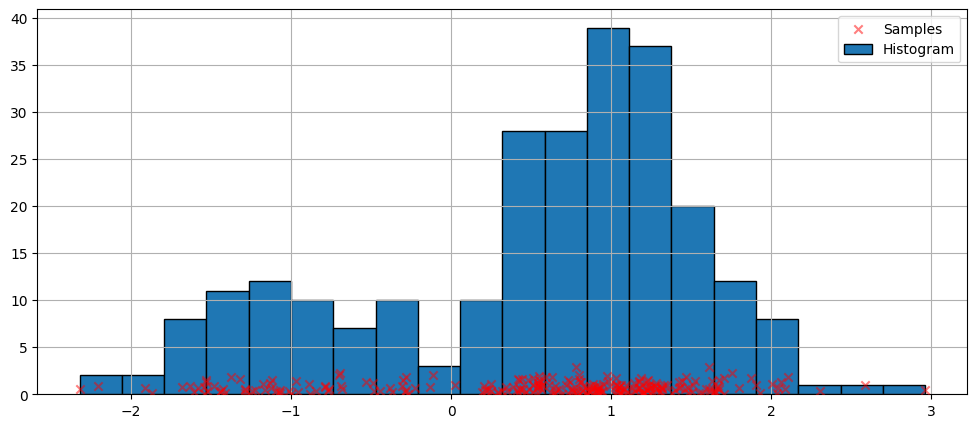
密度推定の最も簡単な非パラメトリック手法はヒストグラムです。
[4]:
fig = plt.figure(figsize=(12, 5))
ax = fig.add_subplot(111)

# Scatter plot of data samples and histogram
ax.scatter(
    obs_dist,
    np.abs(np.random.randn(obs_dist.size)),
    zorder=15,
    color="red",
    marker="x",
    alpha=0.5,
    label="Samples",
)
lines = ax.hist(obs_dist, bins=20, edgecolor="k", label="Histogram")

ax.legend(loc="best")
ax.grid(True, zorder=-5)
デフォルト引数でのフィット
上記のヒストグラムは不連続です。連続的な確率密度関数を計算するために、カーネル密度推定を使用することができます。
KDEUnivariateを使用して、単変量カーネル密度推定量を初期化します。
[5]:
kde = sm.nonparametric.KDEUnivariate(obs_dist)
kde.fit()  # Estimate the densities
[5]:
<statsmodels.nonparametric.kde.KDEUnivariate at 0x135f373b4c0>
適合度の図と、実際の分布を示します。
[6]:
fig = plt.figure(figsize=(12, 5))
ax = fig.add_subplot(111)

# Plot the histogram
ax.hist(
    obs_dist,
    bins=20,
    density=True,
    label="Histogram from samples",
    zorder=5,
    edgecolor="k",
    alpha=0.5,
)

# Plot the KDE as fitted using the default arguments
ax.plot(kde.support, kde.density, lw=3, label="KDE from samples", zorder=10)

# Plot the true distribution
true_values = (
    stats.norm.pdf(loc=dist1_loc, scale=dist1_scale, x=kde.support) * weight1
    + stats.norm.pdf(loc=dist2_loc, scale=dist2_scale, x=kde.support) * weight2
)
ax.plot(kde.support, true_values, lw=3, label="True distribution", zorder=15)

# Plot the samples
ax.scatter(
    obs_dist,
    np.abs(np.random.randn(obs_dist.size)) / 40,
    marker="x",
    color="red",
    zorder=20,
    label="Samples",
    alpha=0.5,
)

ax.legend(loc="best")
ax.grid(True, zorder=-5)
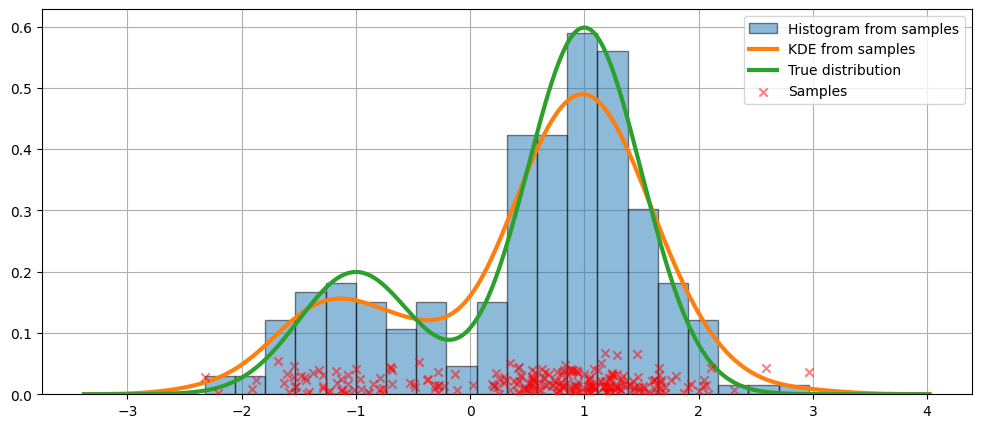
上記のコードでは、デフォルトの引数が使用されました。次に、カーネルの帯域幅を変更する方法を見ていきましょう。
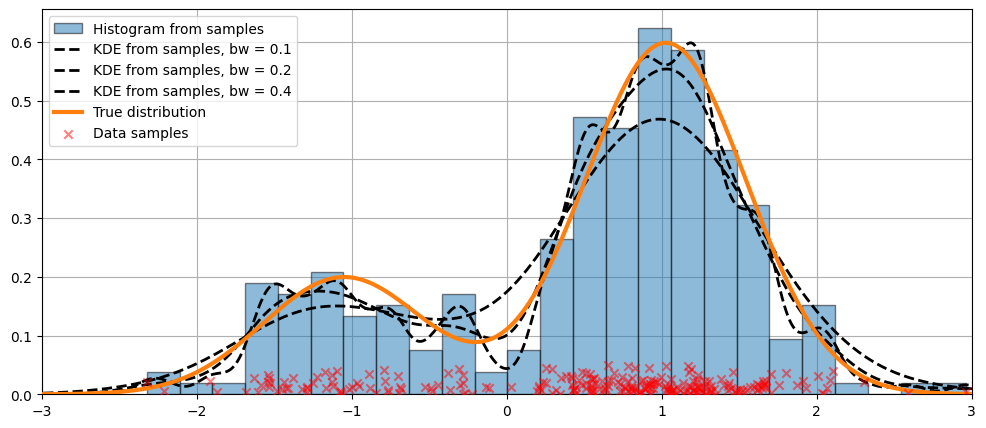
bw 引数を使用して帯域幅を変更する
bw 引数を使用して調整できます。bw=0.2 のバンド幅がデータにうまくフィットしているようです。[7]:
fig = plt.figure(figsize=(12, 5))
ax = fig.add_subplot(111)

# Plot the histogram
ax.hist(
    obs_dist,
    bins=25,
    label="Histogram from samples",
    zorder=5,
    edgecolor="k",
    density=True,
    alpha=0.5,
)

# Plot the KDE for various bandwidths
for bandwidth in [0.1, 0.2, 0.4]:
    kde.fit(bw=bandwidth)  # Estimate the densities
    ax.plot(
        kde.support,
        kde.density,
        "--",
        lw=2,
        color="k",
        zorder=10,
        label="KDE from samples, bw = {}".format(round(bandwidth, 2)),
    )

# Plot the true distribution
ax.plot(kde.support, true_values, lw=3, label="True distribution", zorder=15)

# Plot the samples
ax.scatter(
    obs_dist,
    np.abs(np.random.randn(obs_dist.size)) / 50,
    marker="x",
    color="red",
    zorder=20,
    label="Data samples",
    alpha=0.5,
)

ax.legend(loc="best")
ax.set_xlim([-3, 3])
ax.grid(True, zorder=-5)
カーネル関数の比較
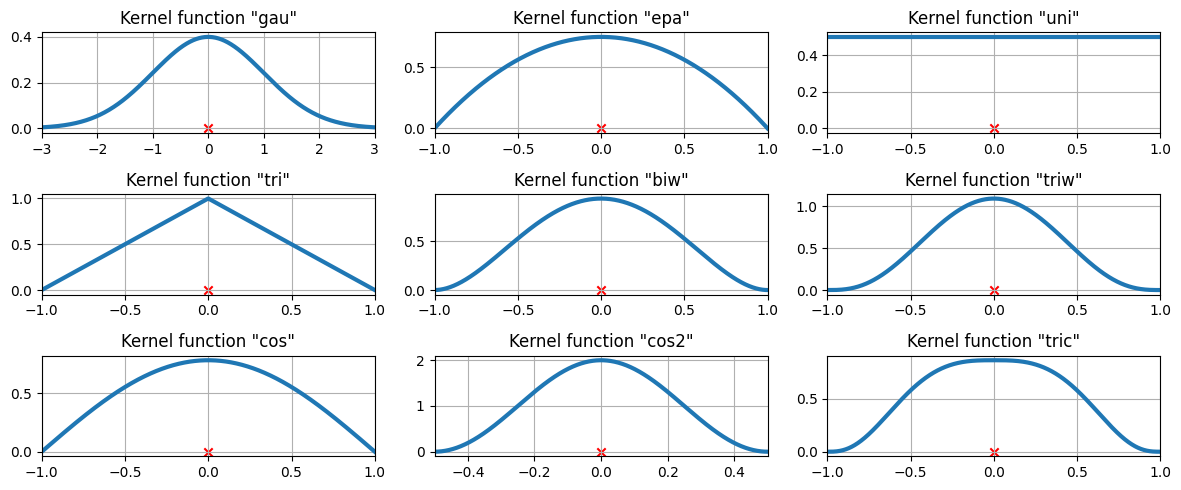
上記の例では、ガウスカーネルが使用されました。他にもいくつかのカーネルが利用可能です。
[8]:
from statsmodels.nonparametric.kde import kernel_switch

list(kernel_switch.keys())
[8]:
['gau', 'epa', 'uni', 'tri', 'biw', 'triw', 'cos', 'cos2', 'tric']
使用可能なカーネル関数
[9]:
# Create a figure
fig = plt.figure(figsize=(12, 5))

# Enumerate every option for the kernel
for i, (ker_name, ker_class) in enumerate(kernel_switch.items()):

    # Initialize the kernel object
    kernel = ker_class()

    # Sample from the domain
    domain = kernel.domain or [-3, 3]
    x_vals = np.linspace(*domain, num=2 ** 10)
    y_vals = kernel(x_vals)

    # Create a subplot, set the title
    ax = fig.add_subplot(3, 3, i + 1)
    ax.set_title('Kernel function "{}"'.format(ker_name))
    ax.plot(x_vals, y_vals, lw=3, label="{}".format(ker_name))
    ax.scatter([0], [0], marker="x", color="red")
    plt.grid(True, zorder=-5)
    ax.set_xlim(domain)

plt.tight_layout()
3つのデータポイントで利用可能なカーネル関数
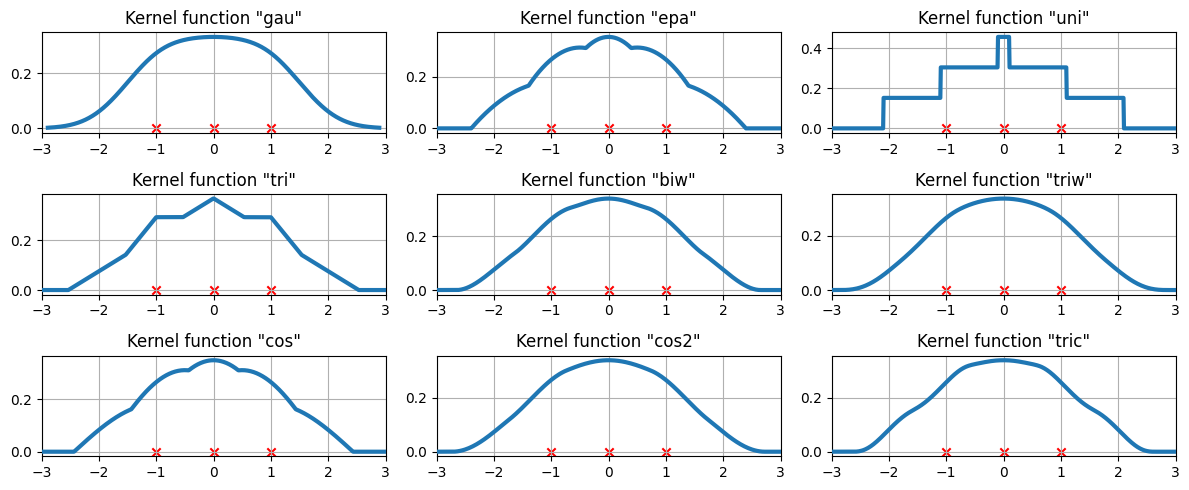
現在、カーネル密度推定が3つの等間隔のデータ点にどのようにフィットするかを調べます。
[10]:
# Create three equidistant points
data = np.linspace(-1, 1, 3)
kde = sm.nonparametric.KDEUnivariate(data)

# Create a figure
fig = plt.figure(figsize=(12, 5))

# Enumerate every option for the kernel
for i, kernel in enumerate(kernel_switch.keys()):

    # Create a subplot, set the title
    ax = fig.add_subplot(3, 3, i + 1)
    ax.set_title('Kernel function "{}"'.format(kernel))

    # Fit the model (estimate densities)
    kde.fit(kernel=kernel, fft=False, gridsize=2 ** 10)

    # Create the plot
    ax.plot(kde.support, kde.density, lw=3, label="KDE from samples", zorder=10)
    ax.scatter(data, np.zeros_like(data), marker="x", color="red")
    plt.grid(True, zorder=-5)
    ax.set_xlim([-3, 3])

plt.tight_layout()
より難しいケース
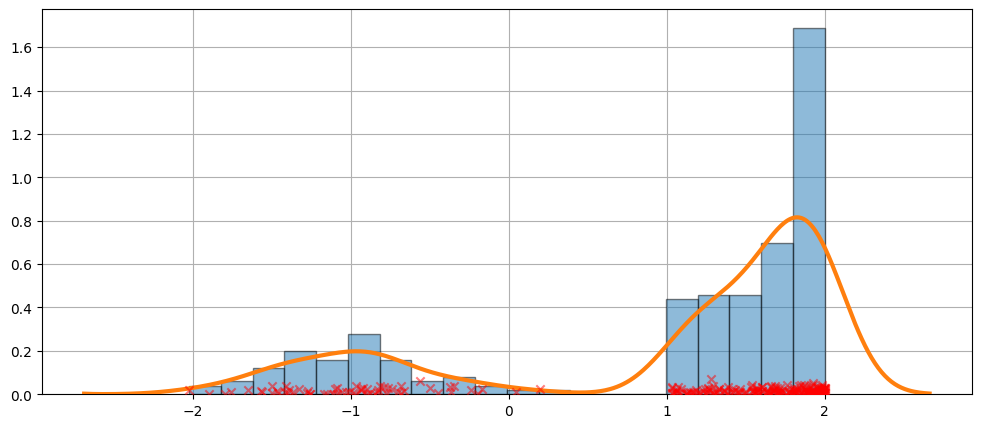
フィットが常に完璧であるわけではありません。下記の例で、より難しいケースを見てみましょう。
[11]:
obs_dist = mixture_rvs(
    [0.25, 0.75],
    size=250,
    dist=[stats.norm, stats.beta],
    kwargs=(dict(loc=-1, scale=0.5), dict(loc=1, scale=1, args=(1, 0.5))),
)
[12]:
kde = sm.nonparametric.KDEUnivariate(obs_dist)
kde.fit()
[12]:
<statsmodels.nonparametric.kde.KDEUnivariate at 0x135f68fd150>
[13]:
fig = plt.figure(figsize=(12, 5))
ax = fig.add_subplot(111)
ax.hist(obs_dist, bins=20, density=True, edgecolor="k", zorder=4, alpha=0.5)
ax.plot(kde.support, kde.density, lw=3, zorder=7)
# Plot the samples
ax.scatter(
    obs_dist,
    np.abs(np.random.randn(obs_dist.size)) / 50,
    marker="x",
    color="red",
    zorder=20,
    label="Data samples",
    alpha=0.5,
)
ax.grid(True, zorder=-5)
KDEは分布です
KDEは分布であるため、次のような属性やメソッドにアクセスできます:
entropyevaluatecdficdfsfcumhazard
[14]:
obs_dist = mixture_rvs(
    [0.25, 0.75],
    size=1000,
    dist=[stats.norm, stats.norm],
    kwargs=(dict(loc=-1, scale=0.5), dict(loc=1, scale=0.5)),
)
kde = sm.nonparametric.KDEUnivariate(obs_dist)
kde.fit(gridsize=2 ** 10)
[14]:
<statsmodels.nonparametric.kde.KDEUnivariate at 0x135becc74f0>
[15]:
kde.entropy
[15]:
1.314324140492138
[16]:
kde.evaluate(-1)
[16]:
array([0.18085886])
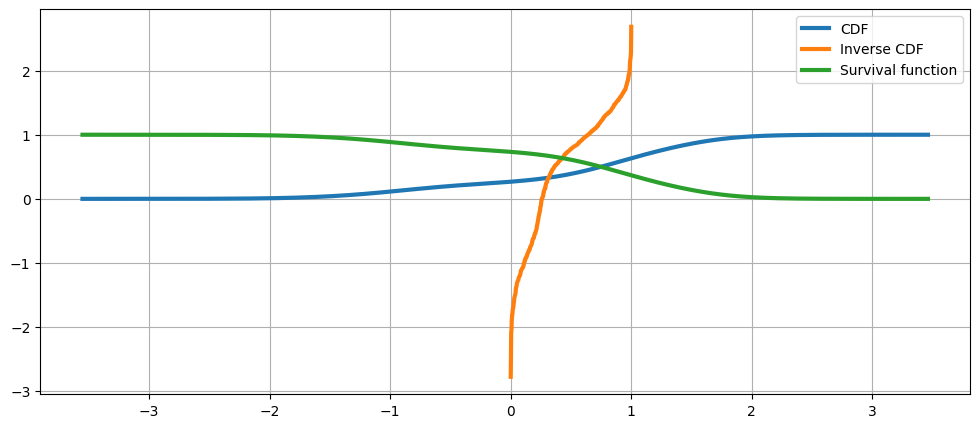
累積分布関数、その逆関数、および生存関数
[17]:
fig = plt.figure(figsize=(12, 5))
ax = fig.add_subplot(111)

ax.plot(kde.support, kde.cdf, lw=3, label="CDF")
ax.plot(np.linspace(0, 1, num=kde.icdf.size), kde.icdf, lw=3, label="Inverse CDF")
ax.plot(kde.support, kde.sf, lw=3, label="Survival function")
ax.legend(loc="best")
ax.grid(True, zorder=-5)
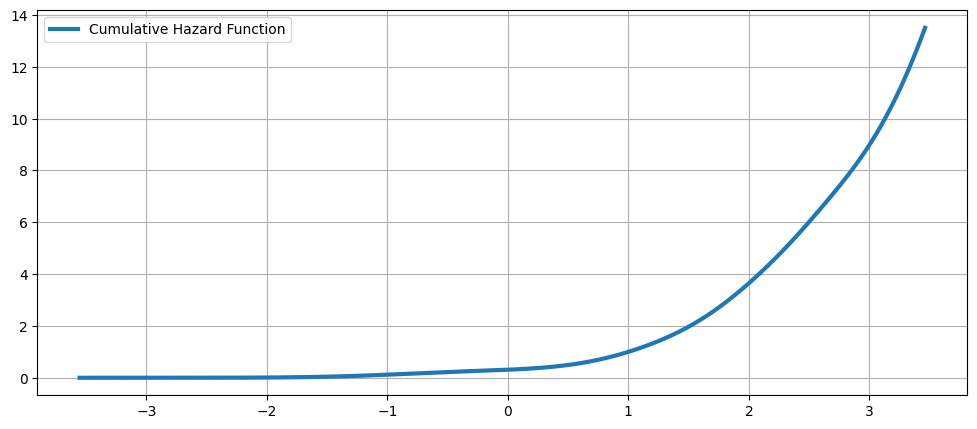
累積ハザード関数
[18]:
fig = plt.figure(figsize=(12, 5))
ax = fig.add_subplot(111)
ax.plot(kde.support, kde.cumhazard, lw=3, label="Cumulative Hazard Function")
ax.legend(loc="best")
ax.grid(True, zorder=-5)