指数平滑法
HyndmanとAthanasopoulosによる優れた専門書「指数平滑法」に関する第7章を取り上げます【1】。 章の中で紹介されているすべての例を順を追って進めていきます。
【1】 Hyndman, Rob J., and George Athanasopoulos. Forecasting: principles and practice. OTexts, 2014.
データの読み込み
まず、データを読み込みます。便宜上、ノートブックにRデータを含めています。
[1]:
import os
import numpy as np
import pandas as pd
import matplotlib.pyplot as plt
from statsmodels.tsa.api import ExponentialSmoothing, SimpleExpSmoothing, Holt

%matplotlib inline

data = [
    446.6565,
    454.4733,
    455.663,
    423.6322,
    456.2713,
    440.5881,
    425.3325,
    485.1494,
    506.0482,
    526.792,
    514.2689,
    494.211,
]
index = pd.date_range(start="1996", end="2008", freq="A")
oildata = pd.Series(data, index)

data = [
    17.5534,
    21.86,
    23.8866,
    26.9293,
    26.8885,
    28.8314,
    30.0751,
    30.9535,
    30.1857,
    31.5797,
    32.5776,
    33.4774,
    39.0216,
    41.3864,
    41.5966,
]
index = pd.date_range(start="1990", end="2005", freq="A")
air = pd.Series(data, index)

data = [
    263.9177,
    268.3072,
    260.6626,
    266.6394,
    277.5158,
    283.834,
    290.309,
    292.4742,
    300.8307,
    309.2867,
    318.3311,
    329.3724,
    338.884,
    339.2441,
    328.6006,
    314.2554,
    314.4597,
    321.4138,
    329.7893,
    346.3852,
    352.2979,
    348.3705,
    417.5629,
    417.1236,
    417.7495,
    412.2339,
    411.9468,
    394.6971,
    401.4993,
    408.2705,
    414.2428,
]
index = pd.date_range(start="1970", end="2001", freq="A")
livestock2 = pd.Series(data, index)

data = [407.9979, 403.4608, 413.8249, 428.105, 445.3387, 452.9942, 455.7402]
index = pd.date_range(start="2001", end="2008", freq="A")
livestock3 = pd.Series(data, index)

data = [
    41.7275,
    24.0418,
    32.3281,
    37.3287,
    46.2132,
    29.3463,
    36.4829,
    42.9777,
    48.9015,
    31.1802,
    37.7179,
    40.4202,
    51.2069,
    31.8872,
    40.9783,
    43.7725,
    55.5586,
    33.8509,
    42.0764,
    45.6423,
    59.7668,
    35.1919,
    44.3197,
    47.9137,
]
index = pd.date_range(start="2005", end="2010-Q4", freq="QS-OCT")
aust = pd.Series(data, index)
C:\Users\user\AppData\Local\Temp\ipykernel_10924\327638849.py:23: FutureWarning: 'A' is deprecated and will be removed in a future version, please use 'YE' instead.
  index = pd.date_range(start="1996", end="2008", freq="A")
C:\Users\user\AppData\Local\Temp\ipykernel_10924\327638849.py:43: FutureWarning: 'A' is deprecated and will be removed in a future version, please use 'YE' instead.
  index = pd.date_range(start="1990", end="2005", freq="A")
C:\Users\user\AppData\Local\Temp\ipykernel_10924\327638849.py:79: FutureWarning: 'A' is deprecated and will be removed in a future version, please use 'YE' instead.
  index = pd.date_range(start="1970", end="2001", freq="A")
C:\Users\user\AppData\Local\Temp\ipykernel_10924\327638849.py:83: FutureWarning: 'A' is deprecated and will be removed in a future version, please use 'YE' instead.
  index = pd.date_range(start="2001", end="2008", freq="A")
単純指数平滑法
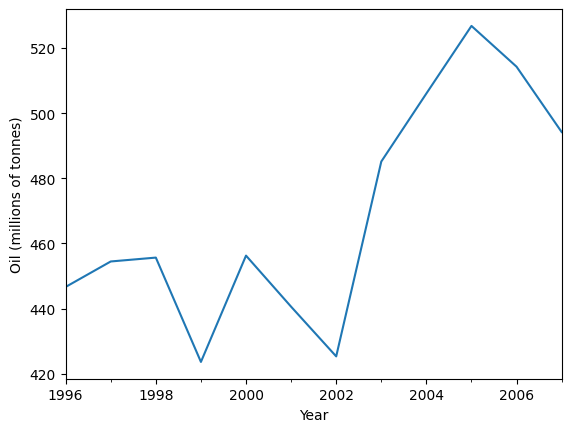
以下の石油データを予測するために、単純指数平滑法を使用しましょう。
[2]:
ax = oildata.plot()
ax.set_xlabel("Year")
ax.set_ylabel("Oil (millions of tonnes)")
print("Figure 7.1: Oil production in Saudi Arabia from 1996 to 2007.")
Figure 7.1: Oil production in Saudi Arabia from 1996 to 2007.
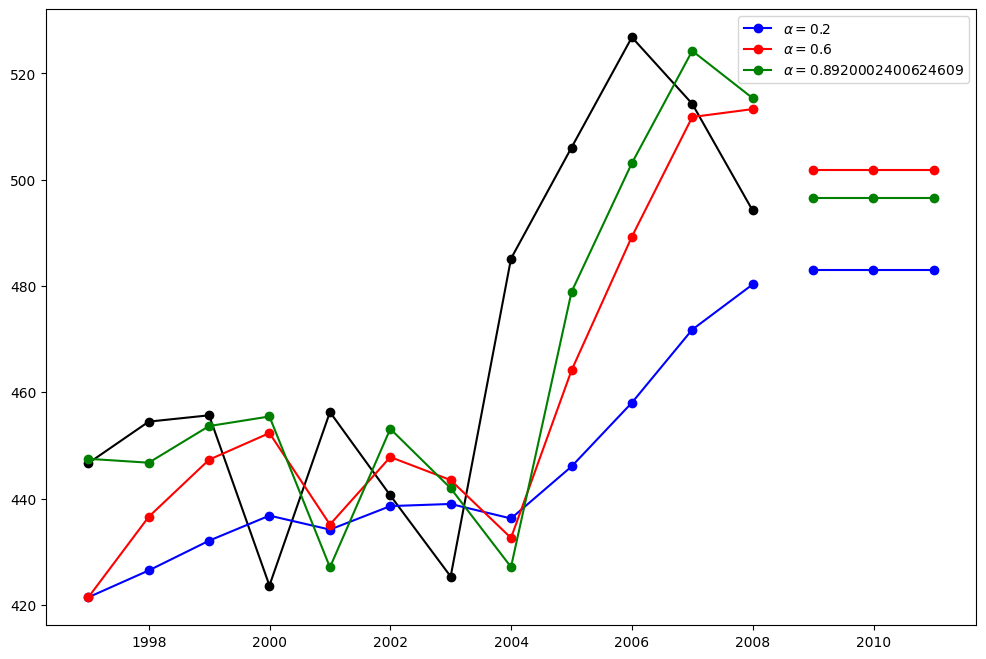
ここでは、単純指数平滑法の3つのバリアントを実行します:
fit1では、自己最適化を使用せず、代わりにモデルに明示的に\(\alpha=0.2\)のパラメータを提供します。fit2では、上記のように\(\alpha=0.6\)を選択します。fit3では、statsmodelsに自動的に最適化された\(\alpha\)値を見つけさせます。これが推奨されるアプローチです。
[3]:
fit1 = SimpleExpSmoothing(oildata, initialization_method="heuristic").fit(
    smoothing_level=0.2, optimized=False
)
fcast1 = fit1.forecast(3).rename(r"$\alpha=0.2$")
fit2 = SimpleExpSmoothing(oildata, initialization_method="heuristic").fit(
    smoothing_level=0.6, optimized=False
)
fcast2 = fit2.forecast(3).rename(r"$\alpha=0.6$")
fit3 = SimpleExpSmoothing(oildata, initialization_method="estimated").fit()
fcast3 = fit3.forecast(3).rename(r"$\alpha=%s$" % fit3.model.params["smoothing_level"])

plt.figure(figsize=(12, 8))
plt.plot(oildata, marker="o", color="black")
plt.plot(fit1.fittedvalues, marker="o", color="blue")
(line1,) = plt.plot(fcast1, marker="o", color="blue")
plt.plot(fit2.fittedvalues, marker="o", color="red")
(line2,) = plt.plot(fcast2, marker="o", color="red")
plt.plot(fit3.fittedvalues, marker="o", color="green")
(line3,) = plt.plot(fcast3, marker="o", color="green")
plt.legend([line1, line2, line3], [fcast1.name, fcast2.name, fcast3.name])
[3]:
<matplotlib.legend.Legend at 0x2a651ac68f0>
ホルト法
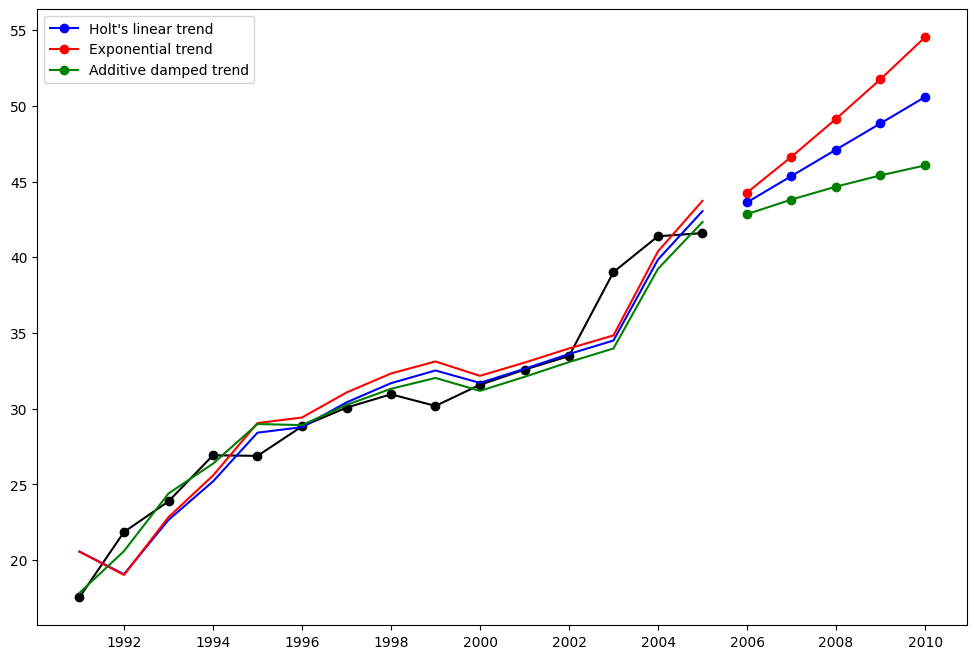
別の例を見てみましょう。 今回は大気汚染データを使用し、ホルト法を適用します。 再び3つの例を適合させます。
fit1では、最適化器を使用せず、\(\alpha=0.8\) と \(\beta=0.2\) の明示的な値を提供します。fit2では、fit1と同様に行いますが、ホルトの加法モデルではなく指数モデルを使用します。fit3では、ホルトの加法モデルの減衰版を使用し、減衰パラメータ\(\phi\)を最適化可能にし、\(\alpha=0.8\) と \(\beta=0.2\) の値は固定します。
[4]:
fit1 = Holt(air, initialization_method="estimated").fit(
    smoothing_level=0.8, smoothing_trend=0.2, optimized=False
)
fcast1 = fit1.forecast(5).rename("Holt's linear trend")
fit2 = Holt(air, exponential=True, initialization_method="estimated").fit(
    smoothing_level=0.8, smoothing_trend=0.2, optimized=False
)
fcast2 = fit2.forecast(5).rename("Exponential trend")
fit3 = Holt(air, damped_trend=True, initialization_method="estimated").fit(
    smoothing_level=0.8, smoothing_trend=0.2
)
fcast3 = fit3.forecast(5).rename("Additive damped trend")

plt.figure(figsize=(12, 8))
plt.plot(air, marker="o", color="black")
plt.plot(fit1.fittedvalues, color="blue")
(line1,) = plt.plot(fcast1, marker="o", color="blue")
plt.plot(fit2.fittedvalues, color="red")
(line2,) = plt.plot(fcast2, marker="o", color="red")
plt.plot(fit3.fittedvalues, color="green")
(line3,) = plt.plot(fcast3, marker="o", color="green")
plt.legend([line1, line2, line3], [fcast1.name, fcast2.name, fcast3.name])
[4]:
<matplotlib.legend.Legend at 0x2a671105a80>
季節調整済みデータ
注: fit4はパラメータ\(\phi\)を最適化できないため、\(\phi=0.98\)の固定値を提供しています。
[5]:
fit1 = SimpleExpSmoothing(livestock2, initialization_method="estimated").fit()
fit2 = Holt(livestock2, initialization_method="estimated").fit()
fit3 = Holt(livestock2, exponential=True, initialization_method="estimated").fit()
fit4 = Holt(livestock2, damped_trend=True, initialization_method="estimated").fit(
    damping_trend=0.98
)
fit5 = Holt(
    livestock2, exponential=True, damped_trend=True, initialization_method="estimated"
).fit()
params = [
    "smoothing_level",
    "smoothing_trend",
    "damping_trend",
    "initial_level",
    "initial_trend",
]
results = pd.DataFrame(
    index=[r"$\alpha$", r"$\beta$", r"$\phi$", r"$l_0$", "$b_0$", "SSE"],
    columns=["SES", "Holt's", "Exponential", "Additive", "Multiplicative"],
)
results["SES"] = [fit1.params[p] for p in params] + [fit1.sse]
results["Holt's"] = [fit2.params[p] for p in params] + [fit2.sse]
results["Exponential"] = [fit3.params[p] for p in params] + [fit3.sse]
results["Additive"] = [fit4.params[p] for p in params] + [fit4.sse]
results["Multiplicative"] = [fit5.params[p] for p in params] + [fit5.sse]
results
[5]:
| SES | Holt's | Exponential | Additive | Multiplicative | |
|---|---|---|---|---|---|
| $\alpha$ | 1.000000 | 0.974338 | 0.977642 | 0.978843 | 9.749169e-01 |
| $\beta$ | NaN | 0.000000 | 0.000000 | 0.000008 | 5.952922e-10 |
| $\phi$ | NaN | NaN | NaN | 0.980000 | 9.816500e-01 |
| $l_0$ | 263.917703 | 258.882683 | 260.335599 | 257.357716 | 2.589521e+02 |
| $b_0$ | NaN | 5.010856 | 1.013780 | 6.645297 | 1.038139e+00 |
| SSE | 6761.350235 | 6004.138207 | 6104.194782 | 6036.597169 | 6.081995e+03 |
季節調整済みデータのプロット
以下のプロットは、上記の表に基づく適合のレベルおよび傾き/トレンド成分を評価するためのものです。
[6]:
for fit in [fit2, fit4]:
    pd.DataFrame(np.c_[fit.level, fit.trend]).rename(
        columns={0: "level", 1: "slope"}
    ).plot(subplots=True)
plt.show()
print(
    "Figure 7.4: Level and slope components for Holt’s linear trend method and the additive damped trend method."
)
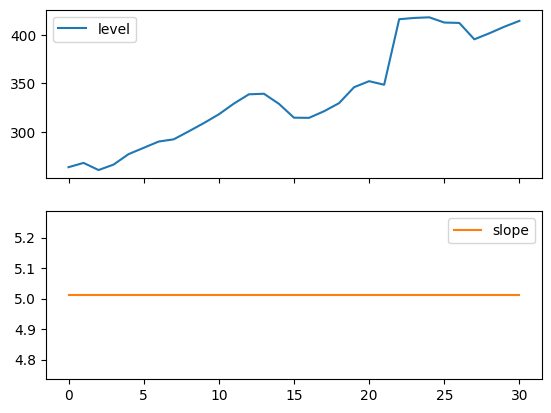
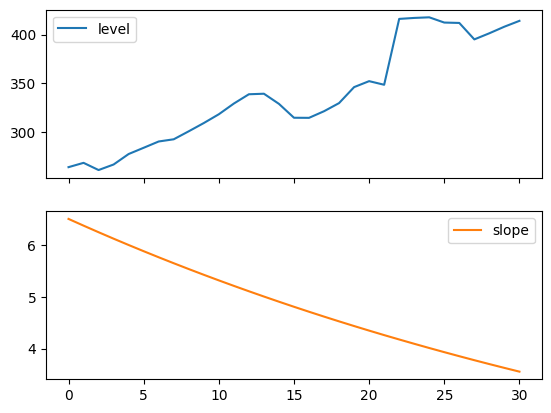
Figure 7.4: Level and slope components for Holt’s linear trend method and the additive damped trend method.
比較
ここでは、単純指数平滑法とホルト法を、さまざまな加法的、指数的、および減衰型の組み合わせについて比較したプロットを示します。すべてのモデルのパラメータは、statsmodelsによって最適化されます。
[7]:
fit1 = SimpleExpSmoothing(livestock2, initialization_method="estimated").fit()
fcast1 = fit1.forecast(9).rename("SES")
fit2 = Holt(livestock2, initialization_method="estimated").fit()
fcast2 = fit2.forecast(9).rename("Holt's")
fit3 = Holt(livestock2, exponential=True, initialization_method="estimated").fit()
fcast3 = fit3.forecast(9).rename("Exponential")
fit4 = Holt(livestock2, damped_trend=True, initialization_method="estimated").fit(
    damping_trend=0.98
)
fcast4 = fit4.forecast(9).rename("Additive Damped")
fit5 = Holt(
    livestock2, exponential=True, damped_trend=True, initialization_method="estimated"
).fit()
fcast5 = fit5.forecast(9).rename("Multiplicative Damped")

ax = livestock2.plot(color="black", marker="o", figsize=(12, 8))
livestock3.plot(ax=ax, color="black", marker="o", legend=False)
fcast1.plot(ax=ax, color="red", legend=True)
fcast2.plot(ax=ax, color="green", legend=True)
fcast3.plot(ax=ax, color="blue", legend=True)
fcast4.plot(ax=ax, color="cyan", legend=True)
fcast5.plot(ax=ax, color="magenta", legend=True)
ax.set_ylabel("Livestock, sheep in Asia (millions)")
plt.show()
print(
    "Figure 7.5: Forecasting livestock, sheep in Asia: comparing forecasting performance of non-seasonal methods."
)
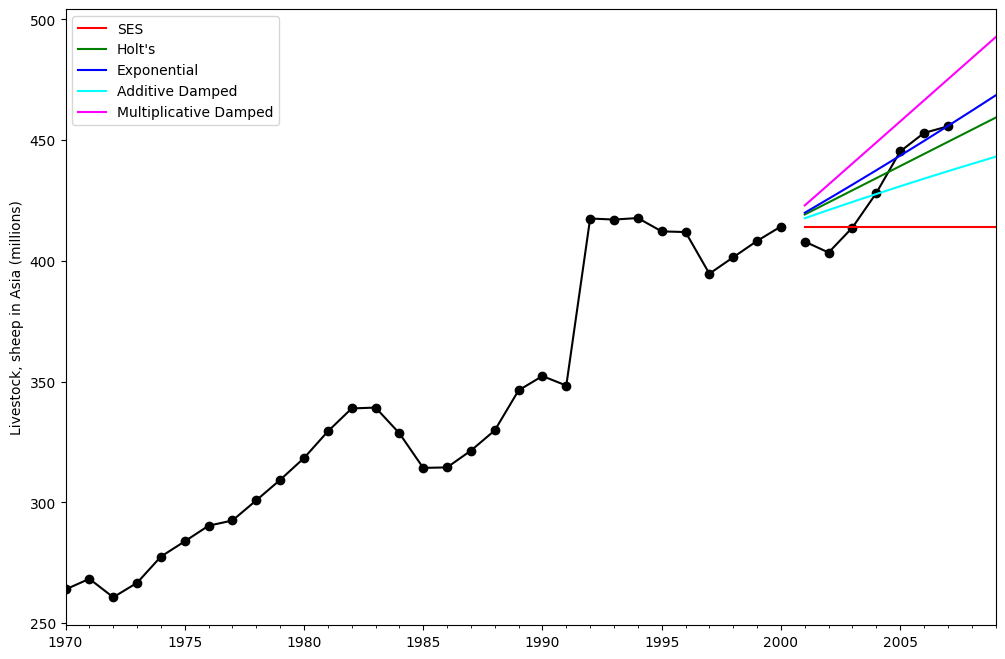
Figure 7.5: Forecasting livestock, sheep in Asia: comparing forecasting performance of non-seasonal methods.
ホルト・ウィンターズ季節指数平滑法
statsmodels は、以下に示すように、すべての組み合わせをサポートしています:fit1加算トレンド、加算季節(周期season_length=4)、およびボックスコックス変換の使用。fit2加算トレンド、乗算季節(周期season_length=4)、およびボックスコックス変換の使用。fit3加算減衰トレンド、加算季節(周期season_length=4)、およびボックスコックス変換の使用。fit4加算減衰トレンド、乗算季節(周期season_length=4)、およびボックスコックス変換の使用。
fit1 と fit2 の結果と予測を示しています。[8]:
fit1 = ExponentialSmoothing(
    aust,
    seasonal_periods=4,
    trend="add",
    seasonal="add",
    use_boxcox=True,
    initialization_method="estimated",
).fit()
fit2 = ExponentialSmoothing(
    aust,
    seasonal_periods=4,
    trend="add",
    seasonal="mul",
    use_boxcox=True,
    initialization_method="estimated",
).fit()
fit3 = ExponentialSmoothing(
    aust,
    seasonal_periods=4,
    trend="add",
    seasonal="add",
    damped_trend=True,
    use_boxcox=True,
    initialization_method="estimated",
).fit()
fit4 = ExponentialSmoothing(
    aust,
    seasonal_periods=4,
    trend="add",
    seasonal="mul",
    damped_trend=True,
    use_boxcox=True,
    initialization_method="estimated",
).fit()
results = pd.DataFrame(
    index=[r"$\alpha$", r"$\beta$", r"$\phi$", r"$\gamma$", r"$l_0$", "$b_0$", "SSE"]
)
params = [
    "smoothing_level",
    "smoothing_trend",
    "damping_trend",
    "smoothing_seasonal",
    "initial_level",
    "initial_trend",
]
results["Additive"] = [fit1.params[p] for p in params] + [fit1.sse]
results["Multiplicative"] = [fit2.params[p] for p in params] + [fit2.sse]
results["Additive Dam"] = [fit3.params[p] for p in params] + [fit3.sse]
results["Multiplica Dam"] = [fit4.params[p] for p in params] + [fit4.sse]

ax = aust.plot(
    figsize=(10, 6),
    marker="o",
    color="black",
    title="Forecasts from Holt-Winters' multiplicative method",
)
ax.set_ylabel("International visitor night in Australia (millions)")
ax.set_xlabel("Year")
fit1.fittedvalues.plot(ax=ax, style="--", color="red")
fit2.fittedvalues.plot(ax=ax, style="--", color="green")

fit1.forecast(8).rename("Holt-Winters (add-add-seasonal)").plot(
    ax=ax, style="--", marker="o", color="red", legend=True
)
fit2.forecast(8).rename("Holt-Winters (add-mul-seasonal)").plot(
    ax=ax, style="--", marker="o", color="green", legend=True
)

plt.show()
print(
    "Figure 7.6: Forecasting international visitor nights in Australia using Holt-Winters method with both additive and multiplicative seasonality."
)

results
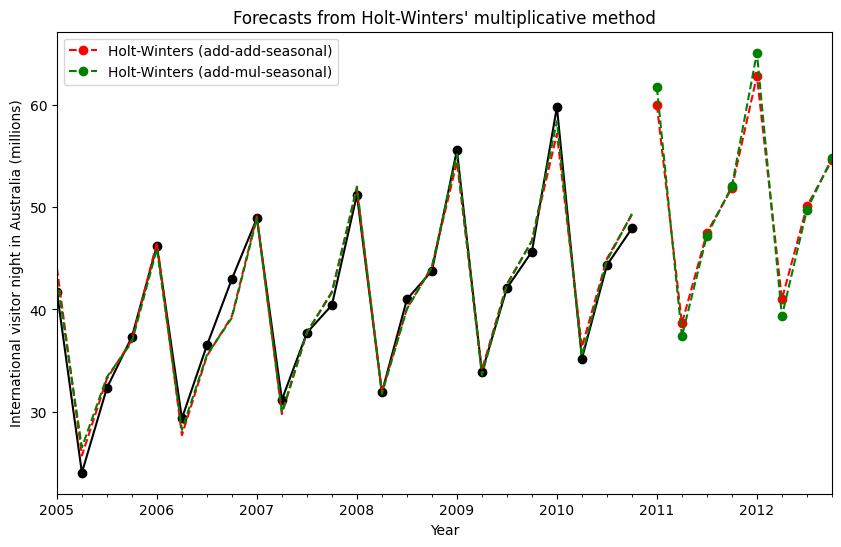
Figure 7.6: Forecasting international visitor nights in Australia using Holt-Winters method with both additive and multiplicative seasonality.
[8]:
| Additive | Multiplicative | Additive Dam | Multiplica Dam | |
|---|---|---|---|---|
| $\alpha$ | 1.490116e-08 | 1.490116e-08 | 1.490116e-08 | 1.490116e-08 |
| $\beta$ | 1.409867e-08 | 0.000000e+00 | 6.490718e-09 | 5.042207e-09 |
| $\phi$ | NaN | NaN | 9.430416e-01 | 9.536043e-01 |
| $\gamma$ | 0.000000e+00 | 0.000000e+00 | 0.000000e+00 | 0.000000e+00 |
| $l_0$ | 1.119348e+01 | 1.106378e+01 | 1.084022e+01 | 9.899298e+00 |
| $b_0$ | 1.205396e-01 | 1.198959e-01 | 2.456749e-01 | 1.975447e-01 |
| SSE | 4.402746e+01 | 3.611262e+01 | 3.527620e+01 | 3.062033e+01 |
モデル内部の詳細
指数平滑法モデルの内部にアクセスすることが可能です。
ここでは、元の値 \(y_t\)、レベル \(l_t\)、傾向 \(b_t\)、季節成分 \(s_t\)、および適合値 \(\hat{y}_t\) を並べて表示できるテーブルを示します。これらの値は、Box-Cox変換を行わずにフィットを実行した場合のみ、元のデータ空間内で意味のある値を持つことに注意してください。
[9]:
fit1 = ExponentialSmoothing(
    aust,
    seasonal_periods=4,
    trend="add",
    seasonal="add",
    initialization_method="estimated",
).fit()
fit2 = ExponentialSmoothing(
    aust,
    seasonal_periods=4,
    trend="add",
    seasonal="mul",
    initialization_method="estimated",
).fit()
[10]:
df = pd.DataFrame(
    np.c_[aust, fit1.level, fit1.trend, fit1.season, fit1.fittedvalues],
    columns=[r"$y_t$", r"$l_t$", r"$b_t$", r"$s_t$", r"$\hat{y}_t$"],
    index=aust.index,
)
forecasts = fit1.forecast(8).rename(r"$\hat{y}_t$").to_frame()
df = pd.concat([df, forecasts], axis=0, sort=True)
[11]:
df = pd.DataFrame(
    np.c_[aust, fit2.level, fit2.trend, fit2.season, fit2.fittedvalues],
    columns=[r"$y_t$", r"$l_t$", r"$b_t$", r"$s_t$", r"$\hat{y}_t$"],
    index=aust.index,
)
forecasts = fit2.forecast(8).rename(r"$\hat{y}_t$").to_frame()
df = pd.concat([df, forecasts], axis=0, sort=True)
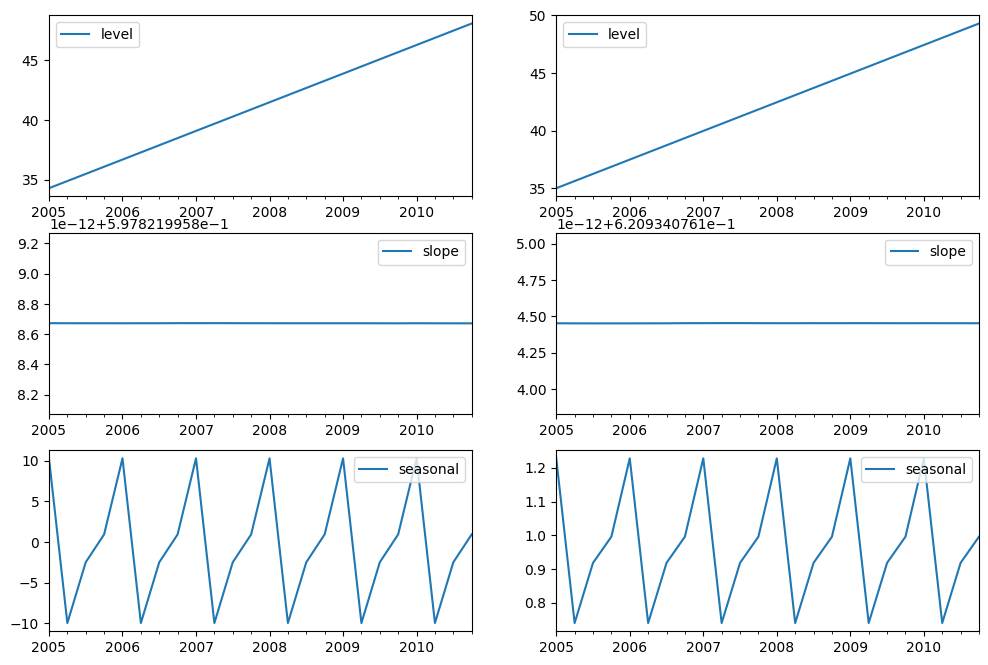
最後に、モデルのレベル、傾き/トレンド、および季節的な成分を見てみましょう。
[12]:
states1 = pd.DataFrame(
    np.c_[fit1.level, fit1.trend, fit1.season],
    columns=["level", "slope", "seasonal"],
    index=aust.index,
)
states2 = pd.DataFrame(
    np.c_[fit2.level, fit2.trend, fit2.season],
    columns=["level", "slope", "seasonal"],
    index=aust.index,
)
fig, [[ax1, ax4], [ax2, ax5], [ax3, ax6]] = plt.subplots(3, 2, figsize=(12, 8))
states1[["level"]].plot(ax=ax1)
states1[["slope"]].plot(ax=ax2)
states1[["seasonal"]].plot(ax=ax3)
states2[["level"]].plot(ax=ax4)
states2[["slope"]].plot(ax=ax5)
states2[["seasonal"]].plot(ax=ax6)
plt.show()
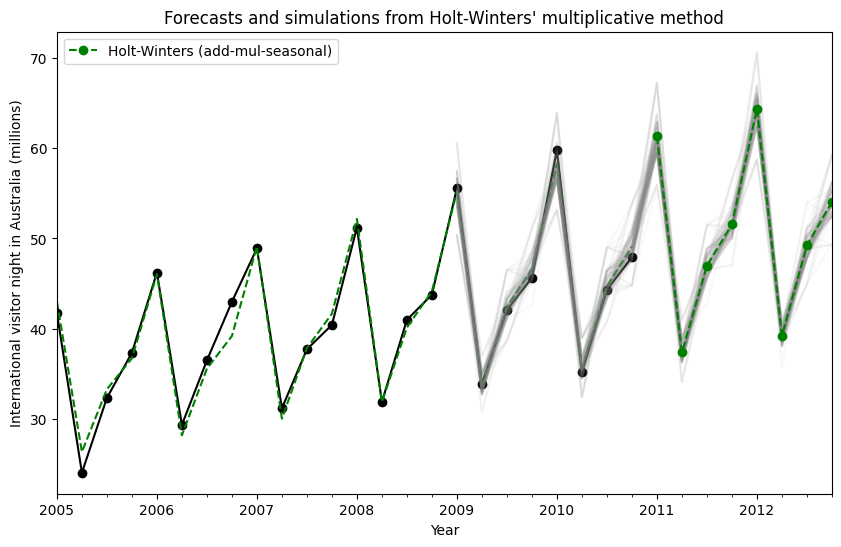
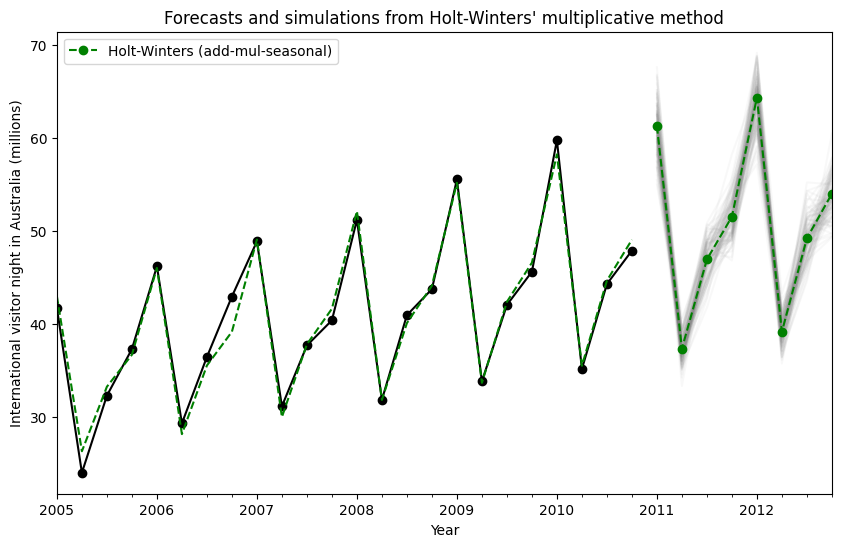
状態空間モデルを使用することにより、将来の値のシミュレーションを行うことができます。数学的な詳細については、HyndmanとAthanasopoulos [2] および HoltWintersResults.simulate のドキュメントに記載されています。
[2] の例と同様に、加法的トレンド、乗法的季節性、乗法的誤差を持つモデルを使用します。最大8ステップ先までシミュレーションを行い、1000回のシミュレーションを実施します。以下の図に示されているように、シミュレーションは予測値と非常によく一致しています。
[13]:
fit = ExponentialSmoothing(
    aust,
    seasonal_periods=4,
    trend="add",
    seasonal="mul",
    initialization_method="estimated",
).fit()
simulations = fit.simulate(8, repetitions=100, error="mul")

ax = aust.plot(
    figsize=(10, 6),
    marker="o",
    color="black",
    title="Forecasts and simulations from Holt-Winters' multiplicative method",
)
ax.set_ylabel("International visitor night in Australia (millions)")
ax.set_xlabel("Year")
fit.fittedvalues.plot(ax=ax, style="--", color="green")
simulations.plot(ax=ax, style="-", alpha=0.05, color="grey", legend=False)
fit.forecast(8).rename("Holt-Winters (add-mul-seasonal)").plot(
    ax=ax, style="--", marker="o", color="green", legend=True
)
plt.show()
シミュレーションは異なる時点から開始することもでき、ランダムノイズを選択するための複数のオプションがあります。
[14]:
fit = ExponentialSmoothing(
    aust,
    seasonal_periods=4,
    trend="add",
    seasonal="mul",
    initialization_method="estimated",
).fit()
simulations = fit.simulate(
    16, anchor="2009-01-01", repetitions=100, error="mul", random_errors="bootstrap"
)

ax = aust.plot(
    figsize=(10, 6),
    marker="o",
    color="black",
    title="Forecasts and simulations from Holt-Winters' multiplicative method",
)
ax.set_ylabel("International visitor night in Australia (millions)")
ax.set_xlabel("Year")
fit.fittedvalues.plot(ax=ax, style="--", color="green")
simulations.plot(ax=ax, style="-", alpha=0.05, color="grey", legend=False)
fit.forecast(8).rename("Holt-Winters (add-mul-seasonal)").plot(
    ax=ax, style="--", marker="o", color="green", legend=True
)
plt.show()